11/28/2025
More Tech Hacks to Streamline & Save
Katie Elzer-Peters
In December I like to look at what will make next spring more efficient, easier and provide a better staff and customer experience. Here’s what bubbled up.
Go All In With Google Workspace
If you’re still using a gmail, hotmail, aol, yahoo or personal, non-domain email for your business, make 2026 the year of change! Go to workspace.google.com and sign up for the least-expensive account. (Select “Individual” and then “Business Standard.”) From there, follow prompts to set up business email with your domain (ex. katie@myawesomegardencenter.com). You’ll need access to your domain registrar. It’s probably GoDaddy or something like it. Don’t know? Put your web address in here: lookup.icann.org and scroll down to “Domain Registrar” to find it. Follow the prompts. Now you have professional email! This will make it much easier for your newsletters to get to your customers, too.
Always buy the end service from the service. For example, if your website is on Squarespace, don’t buy Google Workspace from there, buy it directly from Google. That way if you want to change your website from Squarespace to something else, you don’t have to deal with moving the Google Workspace info.
There’s more to this than email. Are you paying for Dropbox and iCloud storage and Google Workspace? Move all your files to Workspace and cancel the other accounts. (It’s a good idea to periodically download backups of your files, no matter where they are.)
Still using Zoom and Google? Try Google Meet. Using Acuity and Google? Maybe the Google appointment calendar will work.
My point here is: CONSOLIDATE! Save money and the frustration of managing a gajillion different accounts.
Add Paid Online Signup for Workshops
Rockin’ the Google form for signups? Asking customers to call? Make it easier on everyone by putting paid event signups online.
Benefits of online signups:
- Stock control: Don’t accidentally oversell
- Admin ease: Generate a list of attendees and their info for confirmations without losing track of information
- Automated communication: Event confirmations and reminders
- Credit card security: No handling credit card info over the phone
Here are some options for online registration:
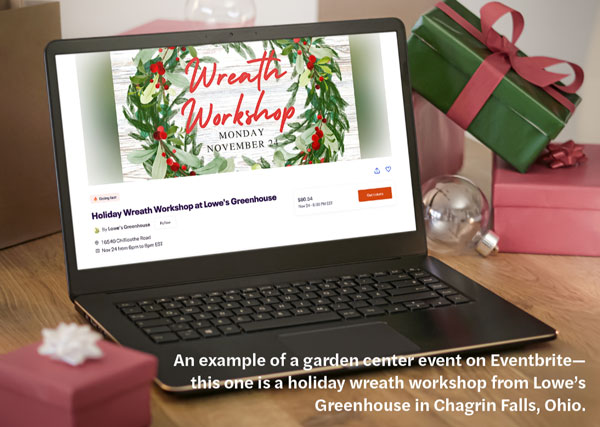
- Eventbrite: This platform is MADE for events. Set up your event and link out to the registration from your website. Yes, you’ll pay a little more, but they’ll handle refunds, customer service, etc.
- Create “Products” on your website or POS: Use Wordpress? Add WooCommerce and make your events products. Use Square POS? Make your events “items” and add stock. You can also create variants for dates or make separate items for dates. Square will let you generate item links for stand-alone checkout pages. Here’s one I’ve made for an upcoming event: tinyurl.com/RRBreakfast (I shortened the URL because it was super long). Have a Squarespace website? Acuity scheduling is now part of their tools suite and a great way to take paid event signups.
These are some other tools/tips that will make things easier for you next year.
- Get a Canva Pro subscription if you don’t already have one. It gives you access to tons of royalty-free stock photos that you would otherwise have to buy separately. It is the best $119 you’ll spend all year. Set up your brand kits with your colors and fonts to make design easy. THEN connect Canva to your email program to directly add your designs to Klaviyo, MailChimp, Constant Contact and more. No more download/upload! Canva also has a social media scheduler.
- Check for integrations on existing programs. Just search for “Does X program integrate with Y” or look in the integrations section of your program to see what will “automagically” connect. For example, you can connect Square to Quickbooks with a few clicks.
- Investigate Zapier if you have two programs that don’t automatically integrate with each other. It’s middleware that connects without code. It IS a subscription service, but it’ll pay for itself with efficiency.
- Shorten URLs for ease of sharing. You can do this for free on TinyURL.com.
- Create a sunset flow for email subscribers. If they’re not opening, kick ’em off your list. That will lower your email bill!
Have you encountered any tech hacks that saved you time and money this year? I’d love to hear about them. Shoot me an email: katie@thegardenofwords.com. GP
Katie Elzer-Peters is the owner of The Garden of Words, LLC, a green-industry digital marketing agency. Contact her at Katie@thegardenofwords.com.